“Put your best face forward. Make sure your audience sees the most accurate, authoritative, and engaging information about you. You can suggest changes to info that shows up on Search, including images, stats, or other facts.” ~Google
Knowledge graphs are a powerful organic SEO tool. Optimising results related to your company can increase the quality of leads or the amount of traffic to your site. By helping Google provide more accurate and accessible information about your business or company, you’re helping them reach their goal to make information more available, accessible, and easy to understand.
This benefits you because you can take control of what Google shows users searching for your company or webpage. Google doesn’t always get it right. Having the power to become the authority on the knowledge graph about your business or organisation means you get to choose what information is shown when people search for you. Considering the prevalence of fake news and inaccurate information that could be floating around on the internet about your company, this control can be really valuable and help you put your best foot forward, so to speak.
Steps to Claiming Your Google Knowledge Graph
If your knowledge graph has not been claimed, a button will appear below the knowledge graph that reads “Claim this knowledge Panel”.

To find out if your knowledge panel has been claimed or not, just Google it. Here is an example of a knowledge panels that has not been claimed. As you can see, the panel lacks a lot of information that the company could easily make available to searchers.
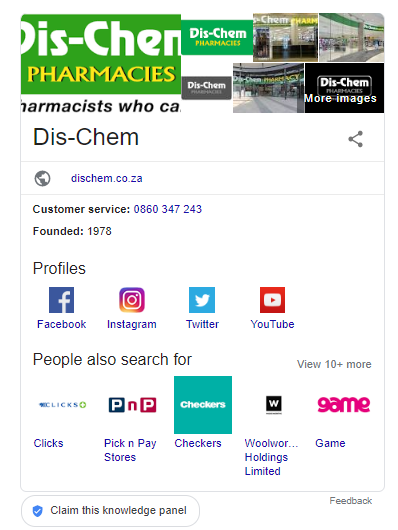
You can claim your knowledge panel in just a few steps. First, click the button that says “claim knowledge panel” that appears underneath the knowledge panel you wish to claim. Next, click “get verified” (it is the only button on the page you are redirected to). You will see options for means by which you can get verification, including via YouTube Channel, Twitter, or Google Search Console.
Once you have claimed your knowledge panel or Knowledge Graph, the button that says “claim this knowledge panel” will disappear, and all the elements on the panel will become editable. You can now add relevant information, remove inaccuracies, and update imagery so your company looks good on Google. In order to edit your knowledge panel, you will need to be logged into your Google Search Console account.
Sources: Hackernoon; SearchEngineLand; Neilpatel;